Ubuntu and Debian on Hetzner
installimage is the normal way to put Ubuntu Server or Debian on a Hetzner dedicated machine. You boot Rescue, choose an image, set disks and RAID, then reboot into a clean OS.
Which OS to pick
| Debian | Ubuntu Server | |
|---|---|---|
| Feel | Stable, conservative | Newer packages, same apt family |
| Rescue | Rescue itself is Debian | Installed from the same installer |
| Later hypervisors | Closest match for Proxmox | Fine for Incus; Proxmox prefers Debian |
Current Hetzner images are listed inside the installer. Names look like Ubuntu-2404-noble-amd64-base or Debian-13xx-trixie-amd64-base.
Interactive install
- Activate Rescue and SSH in.
- Run
installimage. - Choose Ubuntu or Debian.
- Edit the config: drives,
SWRAID, hostname,PART/LVlines. - Save (F10). Wait until it prints that the system is bootable.
reboot. SSH again. Root password is the Rescue password until you change it.
installimageWhat you should see
Hetzner Online GmbH - installimage Please choose the operating system to install Ubuntu-2404-noble-amd64-base.tar.gz Ubuntu-2204-jammy-amd64-base.tar.gz Debian-12-bookworm-amd64-base.tar.gz Debian-13-trixie-amd64-base.tar.gz <OK> <Cancel>Example: two disks, RAID1, LVM
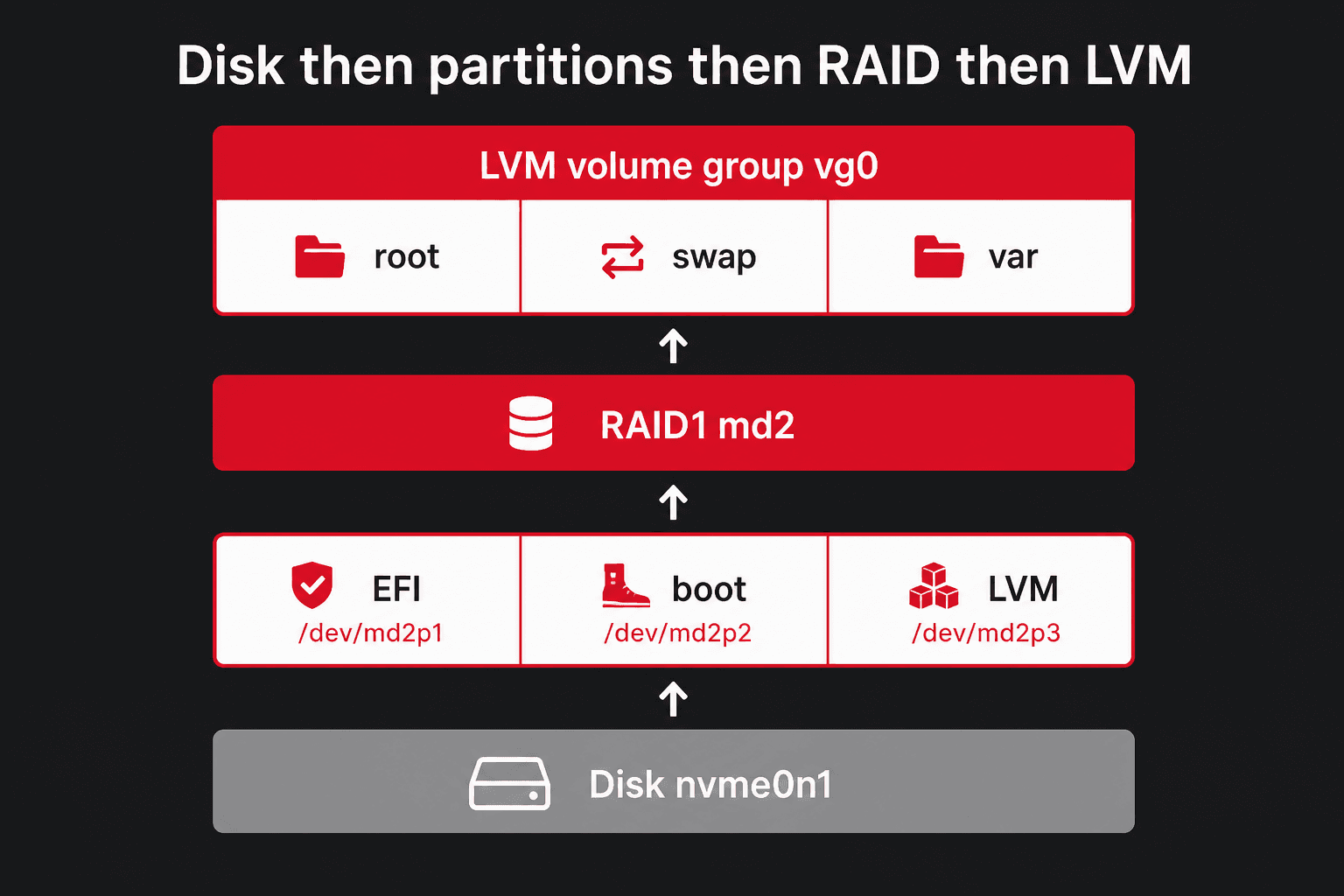
Typical Hetzner layout: two same-size disks, software RAID1, small boot partitions, the rest in LVM. RAID1 keeps the server up if one disk dies. You get the capacity of one disk, not two.
DRIVE1 /dev/nvme0n1DRIVE2 /dev/nvme1n1SWRAID 1SWRAIDLEVEL 1BOOTLOADER grubHOSTNAME dedicated.example.comPART /boot/efi esp 256MPART /boot ext4 1GPART lvm vg0 allLV vg0 root / ext4 50GLV vg0 swap swap swap 8GLV vg0 var /var ext4 all/dev/sda and /dev/sdb. NVMe disks are /dev/nvme0n1 and /dev/nvme1n1. Comment out a DRIVE line with # to leave that disk alone, and renumber DRIVE1, DRIVE2.Example: one disk, no RAID
DRIVE1 /dev/sdaSWRAID 0BOOTLOADER grubHOSTNAME dedicated.example.comPART /boot/efi esp 256MPART /boot ext4 1GPART / ext4 allall means “the rest of the disk”. Put it on the last partition or last logical volume only, or nothing is left after it.
Unattended installimage
Save a file, then run the installer without the menu:
nano /tmp/setup.confinstallimage -a -c /tmp/setup.confWhat you should see
=> Reading from configfile /tmp/setup.conf=> Installing image Ubuntu-2404-noble-amd64-base.tar.gz=> Done.=> The system is now ready to boot.=> Please reboot the server.If Rescue finds /autosetup, it uses that file automatically.
After the first boot
passwdapt updateapt upgrade -ydpkg-reconfigure tzdatatimedatectlWhat you should see
New password:Retype new password:passwd: password updated successfully Hit:1 https://mirror.hetzner.com/ubuntu noble InReleaseReading package lists... DoneBuilding dependency tree... DoneAll packages are up to date. Local time: Tue 2026-04-14 10:22:01 CEST Universal time: Tue 2026-04-14 08:22:01 UTC Time zone: Europe/Berlin (CEST, +0200)System clock synchronized: yes/root/.ssh/authorized_keys before you turn off password login. Test a second SSH window first.apt install -y sudo vim htop tmux curl ca-certificatesWhat you should see
Reading package lists... DoneThe following NEW packages will be installed: ca-certificates curl htop sudo tmux vim0 upgraded, 6 newly installed, 0 to remove.Setting up sudo (1.9.15) ...What the PART line is choosing
PART /boot ext4 1G sets the filesystem (ext4), not an MBR hex code like 83. installimage creates a GPT disk, labels the slices (EFI, Linux filesystem, LVM), then runs mkfs for you. ext4 is the usual Ubuntu/Debian choice; xfs is fine for a large /var. Btrfs is not the installer default — add it later if you want snapshots. Feature comparison: ext2 · ext3 · ext4 · XFS · Btrfs. The three layers (table vs label vs format) are on Partitioning.
Partitions larger than 2 TiB
Use GPT (GUID partition table) and GRUB2. MBR cannot address disks past 2 TB and only allows four primary partitions. installimage already writes GPT for modern Debian and Ubuntu images, so you normally do not pick MBR by hand.