Linux partitioning commands
A disk is the whole device. A partition is a slice of that disk. A filesystem (ext4, xfs, vfat) is the format Linux writes inside a slice. Mounting attaches that filesystem to a folder like / or /boot.
The picture
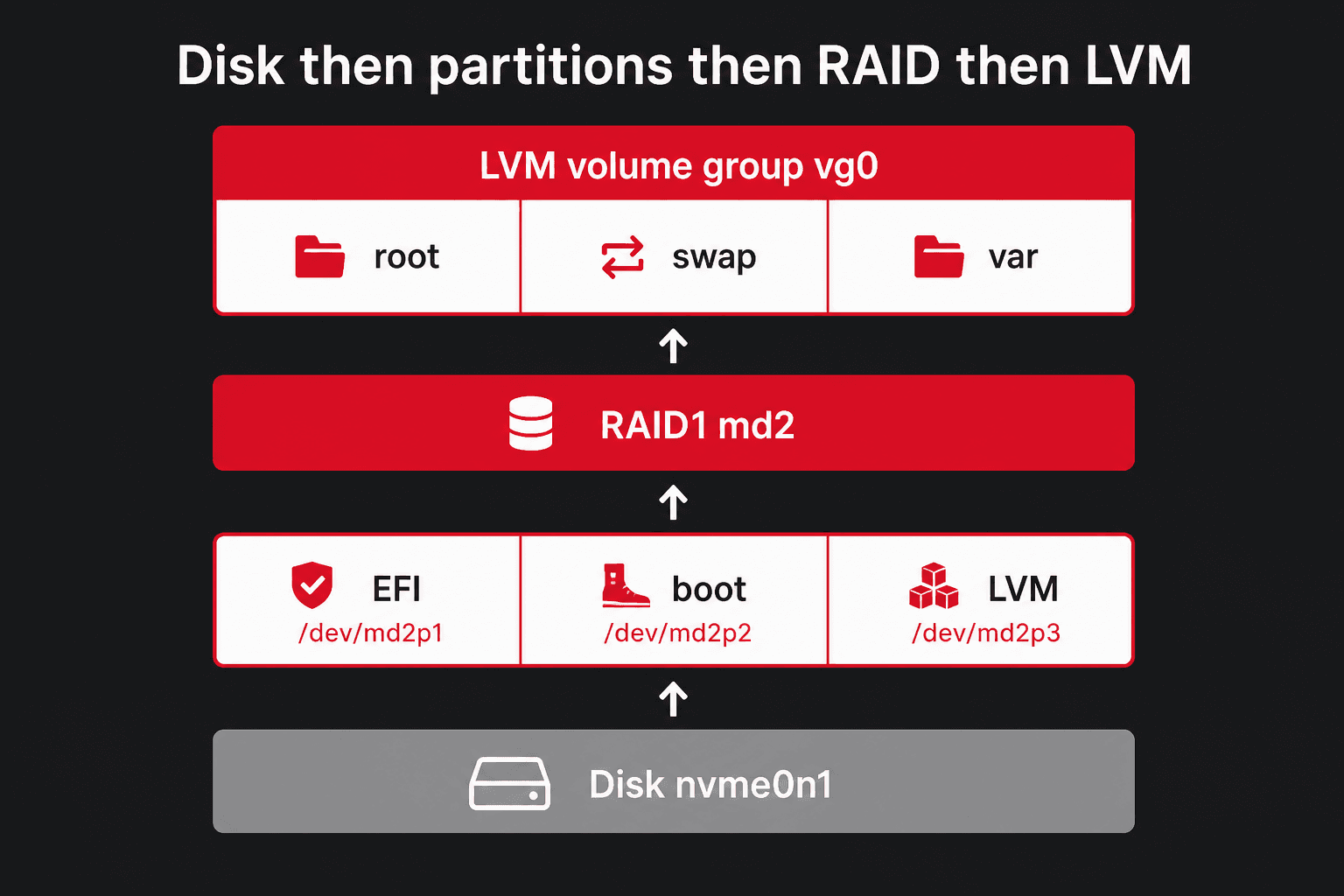
On two-disk RAID1, both disks get the same partition map. Linux then builds /dev/md0, md1, md2 from matching slices.
Device names
| You see | What it is |
|---|---|
/dev/sda | First SATA/SAS disk. Partitions: sda1, sda2, … |
/dev/nvme0n1 | First NVMe. Partitions: nvme0n1p1, nvme0n1p2, … |
/dev/md2 | Software RAID array |
/dev/mapper/vg0-root | LVM logical volume. Same device as /dev/vg0/root. |
/dev/dm-0 | Device Mapper number. Kernel name for LVM, LUKS, or multipath. Prefer the /dev/mapper/… name. |
/dev/mapper/cryptroot | Unlocked LUKS volume. Unlock with cryptsetup luksOpen before you mount. |
/dev/vda | Virtio disk inside a VM (Proxmox/Incus guest). Partitions: vda1, vda2. |
These names stack. A Hetzner RAID1 + LVM box is partition → md2 → vg0-root. You can also see LVM on a plain partition, LUKS then LVM, RAID then LUKS then LVM, or Btrfs on LUKS. In Rescue, start at lsblk -f and mount the top of the tree. Full table of how / can appear: Rescue System.
wipefs destroy data. Prefer installimage on Hetzner unless you already know the layout. Double-check the device with lsblk first.See what exists (safe)
lsblk -o NAME,SIZE,TYPE,FSTYPE,LABEL,MOUNTPOINT,UUIDlsblk -ffindmntdf -hTblkidfdisk -lparted -lWhat you should see
NAME SIZE TYPE FSTYPE MOUNTPOINTnvme0n1 476.9G disk├─nvme0n1p1 256M part vfat /boot/efi├─nvme0n1p2 1G part ext4 /boot└─nvme0n1p3 475G part linux_raid_member └─md2 475G raid1 LVM2_member ├─vg0-root 50G lvm ext4 / ├─vg0-swap 8G lvm swap [SWAP] └─vg0-var 417G lvm ext4 /var /dev/nvme0n1p1: UUID="A1B2-C3D4" TYPE="vfat"/dev/vg0/root: UUID="8f3a1c2d-9e0b-4a17-c5d6-e8f011223344" TYPE="ext4"lsblk is the first command to memorize. TYPE tells you disk vs part vs raid vs lvm. MOUNTPOINT tells you what is actually in use.
Three layers (do not mix them up)
Beginners hear “Linux type” and think it is one acronym like MBR or GPT. It is three different stickers on the same disk.
| Layer | What it is | Example |
|---|---|---|
| Partition table | How the whole disk is divided | MBR or GPT |
| Partition type | A label inside that table | MBR 83, or GPT “Linux filesystem” / “Linux LVM” |
| Filesystem type | The real format that stores files | ext4, xfs, btrfs, swap |
The partition type is only a hint. Linux can still mount ext4 on a slice labelled “Linux LVM” — it works, it is just confusing. Always format with mkfs after you create the slice. lsblk -f and blkid show the real filesystem (FSTYPE / TYPE=ext4).
lsblk -o NAME,SIZE,PARTTYPENAME,FSTYPE,MOUNTPOINTblkidparted /dev/nvme0n1 printWhat you should see
NAME SIZE PARTTYPENAME FSTYPE MOUNTPOINTnvme0n1p1 256M EFI System vfat /boot/efinvme0n1p2 1G Linux filesystem ext4 /bootnvme0n1p3 475G Linux LVM LVM2_member └─vg0-root 50G ext4 / /dev/nvme0n1p2: UUID="…" TYPE="ext4" PARTUUID="…"/dev/mapper/vg0-root: UUID="…" TYPE="ext4"PARTTYPENAME is the partition-table label. FSTYPE / TYPE= is the filesystem you actually formatted. They are not the same column.
GPT vs MBR
MBR = Master Boot Record (1980s). GPT = GUID Partition Table (GUID = Globally Unique Identifier). On Hetzner dedicated servers, GPT is the default and the right choice, together with an EFI System Partition if the box boots UEFI.
| Feature | MBR | GPT |
|---|---|---|
| Age | Old (1980s) | Modern (UEFI standard) |
| Max disk size | 2 TB | Practically unlimited (zettabytes) |
| Max partitions | 4 primary (or 3 + extended) | 128 by default |
| Boot style | Legacy BIOS | UEFI (can still boot with BIOS on some boxes) |
| Reliability | One copy of the table | Copies of the table + checksums |
| Hetzner today | Only for odd compatibility | installimage default |
parted /dev/nvme0n1 print# orparted /dev/sda printWhat you should see
Model: SAMSUNG MZVL (nvme)Disk /dev/nvme0n1: 512GBSector size (logical/physical): 512B/512BPartition Table: gptDisk Flags: Number Start End Size File system Name Flags 1 1049kB 269MB 268MB fat32 boot, esp 2 269MB 1343MB 1074MB ext4 3 1343MB 512GB 511GB lvmPartition type (the label)
After the table is MBR or GPT, each slice still has a type label. It does not format the disk. Tools show a short name; MBR stores a one-byte hex code and GPT stores a long GUID. In fdisk, the t key changes this label.
| Style | Code / name | Meaning |
|---|---|---|
| MBR | 83 | Linux — normal data (you still run mkfs) |
| MBR | 82 | Linux swap |
| MBR | 8e | Linux LVM physical volume |
| MBR | fd | Linux RAID (mdadm). See RAID — this label is not the array. |
| MBR | ef | EFI System (rare on pure MBR) |
| GPT | Linux filesystem | General Linux data (ext4, XFS, Btrfs, …) |
| GPT | Linux LVM | Physical volume for LVM |
| GPT | Linux RAID | Software RAID member |
| GPT | Linux swap | Swap slice |
| GPT | EFI System | /boot/efi |
GPT also has more specific GUIDs (Linux root, Linux home). fdisk and parted print the short name. You do not need to memorize the GUID strings.
lsblk -o NAME,PARTTYPE,PARTTYPENAME,FSTYPEfdisk -l /dev/nvme0n1What you should see
NAME PARTTYPE PARTTYPENAME FSTYPEnvme0n1p1 c12a7328-f81f-11d2-ba4b-00a0c93ec93b EFI System vfatnvme0n1p2 0fc63daf-8483-4772-8e79-3d69d8477de4 Linux filesystem ext4nvme0n1p3 e6d6d379-f507-44c2-a23c-238f2a3df928 Linux LVM LVM2_member Disklabel type: gptDevice Size Type/dev/nvme0n1p2 1G Linux filesystem/dev/nvme0n1p3 475G Linux LVMFile system (the real format)
After you create the slice, you still format it. That is the filesystem people mean when they say “Linux type” — not MBR 83 and not GPT. There is no single acronym like MBR/GPT for this layer. A standard Linux install lets you pick ext2, ext3, ext4, XFS, or Btrfs — each name has a specific meaning.
Find out your file system
There are several ways to see filesystem details. These three are the ones to memorize (same idea as the inventory commands above):
| Command | What it shows |
|---|---|
lsblk -f | LiSt BLocK devices, with -f = filesystems. A tree of disks, RAID, LVM, FSTYPE, UUID, and mount point. Best overview. |
df -hT | Disk Free. -h = human sizes (GiB). -T = type column (ext4, xfs, vfat). Only mounted filesystems. |
blkid | BLocK IDentifier. Prints TYPE=ext4 and UUID=. Use the UUID in /etc/fstab. |
lsblk -fdf -hTblkidWhat you should see
NAME FSTYPE UUID MOUNTPOINTnvme0n1p2 ext4 b7c1d2e3… /bootvg0-root ext4 8f3a1c2d… / Filesystem Type Size Used Avail Use% Mounted on/dev/mapper/vg0-root ext4 49G 6.2G 41G 14% / /dev/mapper/vg0-root: UUID="8f3a1c2d-…" TYPE="ext4"Types of Linux file systems
- ext2 — Second Extended. No journal. First Linux format that could manage about 2 TB.
- ext3 — Third Extended. ext2 plus a journal. Backward compatible with ext2. No snapshots.
- ext4 — Fourth Extended. Default on Debian and Ubuntu (Hetzner installimage).
- XFS — 64-bit journaling filesystem. Default on RHEL 7+. Strong for large files.
- Btrfs — B-tree File System. Snapshots and checksums. Not the installimage OS default.
vfat (FAT32) also appears on the EFI System Partition (/boot/efi). swap is overflow RAM, formatted with mkswap, not mkfs. installimage PART / LV lines pick this layer (ext4, xfs, swap, esp), not an MBR hex code.
ext2 — Extended File System (second generation)
Ext stands for Extended File System. The original Ext was developed in the early 1990s for Linux (inspired by MINIX). That first Ext is an older version and is no longer used — size and reliability limits. What you still see in tools is ext2, then ext3, then ext4.
ext2 is the first Linux filesystem that could manage about two terabytes (2 TB) of data. It has no journal. After a crash or power cut, fsck must scan the whole disk before it is safe to mount. Fine for tiny USB sticks; not for a dedicated server OS.
ext3 — upgraded ext2
ext3 is developed from ext2. It is an upgraded version and keeps backward compatibility: you can mount an ext3 volume as ext2 (the journal is skipped). The upgrade is the journal — crash recovery in seconds instead of a full scan.
Notes often list a major drawback: ext3 does not support file recovery (undelete after rm) or disk snapshots, so some class slides say it is “not for servers.” That is overstated — ext3 ran many servers for years. What is true: no snapshots and no easy undelete. On a new Hetzner box pick ext4 or XFS. For snapshots, use LVM or Btrfs — not ext3.
ext4 — fourth generation
The fourth generation of the Ext family. It is the default filesystem on Debian and Ubuntu (including Hetzner installimage). Older notes also list RHEL; from RHEL 7 onward the default is XFS, not ext4.
Ext4 can read and write ext2 or ext3 volumes. The other way does not work: a modern ext4 filesystem is not compatible with ext2 and ext3 drivers (old kernels cannot mount an extents-based ext4 volume). Format ext4 and stay on ext4.
Ext4 comes with improved features such as:
| Feature | What it means |
|---|---|
| Extent-based metadata | One record for a long run of blocks instead of listing every block. Faster large files, less fragmentation. |
| Delayed allocation | Wait until flush time to pick disk blocks — bigger sequential writes. |
| Journal checksumming | The journal itself is checksummed, so a torn write is less likely to corrupt the filesystem after a crash. |
| Large storage support | Far past ext2’s ~2 TB era. Fine for dedicated NVMe and multi-terabyte volumes. |
| Multi-block allocation | Allocates many blocks in one operation, which cuts CPU work on big writes. |
/ and /boot.XFS file system
XFS is a robust, mature 64-bit journaling filesystem. It supports very large files and filesystems on a single host (scales toward exabytes). It is the default filesystem in RHEL 7 and later (Rocky, Alma too). Ubuntu and Debian support it fully; installimage will put XFS on a large /var.
Journaling keeps a record of filesystem operations. After a crash (for example a power outage), that record is replayed when the system restarts and the filesystem is remounted — so integrity is restored without scanning the whole disk.
XFS supports a wealth of features, including:
| Feature | What it means |
|---|---|
| Delayed allocation | Same idea as ext4: place blocks at write-out time to reduce fragmentation. |
| Dynamically allocated inodes | Inodes are created as you add files. ext4 pre-creates a big inode table at mkfs (df -i). |
| B-tree indexing | Free-space maps use B-trees so they stay fast on huge disks. |
| Online defragmentation | xfs_fsr can defragment while the filesystem is mounted. |
| Online filesystem growing | xfs_growfs / lvextend -r. There is no supported shrink. |
| Diagnostics and fast repair | xfs_info, xfs_repair (from Rescue, not while mounted). Built for large volumes. |
| Streaming and parallel I/O | Optimized for streaming video and a large number of parallel operations (VM disks, logs, backups). |
XFS has no built-in snapshots. Use LVM snapshots, or pick Btrfs, if you need that.
Btrfs (B-tree File System)
Btrfs stands for the B-tree file system (pronounced “butter FS”). It is aimed at fault tolerance, repair, simpler administration, and large storage layouts — not the next ext.
It is copy-on-write: Linux writes a new block, then updates the pointer. That is how snapshots work. Class notes often say it is not a good fit for production and is currently considered experimental, and that it might replace ext4 one day. The kernel has shipped Btrfs for years (Fedora and openSUSE use it in some editions). On a Hetzner dedicated OS disk, still prefer ext4 or XFS; add Btrfs later if you want snapshots (for example an Incus pool).
Btrfs is designed for enormous volumes — notes cite up to a 16 exbibyte partition (far larger than a typical ext4 volume) and very large files. That is not a reason to pick it on a 512 GB NVMe.
Ubuntu desktops may use a subvol=@ layout; Hetzner installimage Ubuntu Server usually uses ext4 on LVM. Do not replace mdadm RAID1 with Btrfs RAID5/6 on the OS disks.
| ext2 | ext3 | ext4 | XFS | Btrfs | |
|---|---|---|---|---|---|
| Journal | No | Yes | Yes | Yes | Copy-on-write |
| Snapshots | No | No | No (use LVM) | No (use LVM) | Yes |
| Hetzner | Do not use | Do not use | Default OS | Large /var | Later (Incus) |
ext4 or xfs via installimage. Add Btrfs later if you want snapshots (or an Incus btrfs pool). Examples of PART lines: Ubuntu & Debian.mkfs.ext4 /dev/sda2mkfs.xfs /dev/vg0/varmkfs.btrfs /dev/sda4mkswap /dev/vg0/swapWhat you should see
mke2fs 1.47.0Creating filesystem with … 4k blocksmeta-data=/dev/vg0/var isize=512 …btrfs-progs v6.xSetting up swapspace version 1, size = 8 GiBparted (manual partitioning)
Use this in Rescue only when installimage cannot express what you want. This example is a single GPT disk:
parted /dev/sda mklabel gptparted /dev/sda mkpart ESP fat32 1MiB 257MiBparted /dev/sda set 1 esp onparted /dev/sda mkpart boot ext4 257MiB 1281MiBparted /dev/sda mkpart lvm 1281MiB 100%parted /dev/sda set 3 lvm onWhat you should see
Information: You may need to update /etc/fstab. # parted prints little on success. Check with:# parted /dev/sda print# Partition Table: gptmkfs.vfat -F32 /dev/sda1mkfs.ext4 /dev/sda2pvcreate /dev/sda3vgcreate vg0 /dev/sda3lvcreate -L 50G -n root vg0lvcreate -L 8G -n swap vg0lvcreate -l 100%FREE -n var vg0mkfs.ext4 /dev/vg0/rootmkfs.ext4 /dev/vg0/varmkswap /dev/vg0/swapWhat you should see
mkfs.fat 4.2 (2021-01-31)mke2fs 1.47.0 (Physical volume "/dev/sda3" successfully created.) Volume group "vg0" successfully created Logical volume "root" created. Logical volume "swap" created. Logical volume "var" created.Setting up swapspace version 1, size = 8 GiBfdisk (interactive)
fdisk /dev/sdaWhat you should see
Welcome to fdisk (util-linux 2.40).Changes will remain in memory only, until you decide to write them.Be careful before using the write command. Command (m for help): p Disk /dev/sda: 476.94 GiB, 512110190592 bytes, 1000215216 sectorsDisklabel type: gpt Device Start End Sectors Size Type/dev/sda1 2048 526335 524288 256M EFI System/dev/sda2 526336 2623487 2097152 1G Linux filesystem/dev/sda3 2623488 1000215182 997591695 476G Linux LVM Command (m for help): qInside fdisk, common keys are:
g— new GPT tablen— new partitiont— type (EFI, Linux filesystem, LVM; on MBR:83,8e,fd)p— printw— write and exitq— quit without saving
LVM in one paragraph
LVM is a second layer on top of a partition (or RAID). Physical volume (PV) → volume group (VG) → logical volumes (LV). You can grow an LV later without repartitioning the whole disk. That is why Hetzner configs often use PART lvm vg0 all then several LV lines.
pvsvgslvsls /dev/mapper/What you should see
PV VG Fmt Attr PSize PFree /dev/md2 vg0 lvm2 a-- 475.56g 16.00m VG #PV #LV #SN Attr VSize VFree vg0 1 3 0 wz--n- 475.56g 16.00m LV VG Attr LSize Pool Origin Data% root vg0 -wi-ao---- 50.00g swap vg0 -wi-ao---- 8.00g var vg0 -wi-ao---- 417.54g control vg0-root vg0-swap vg0-varlvextend -r -L +20G /dev/vg0/root# or give it all remaining free spacelvextend -r -l +100%FREE /dev/vg0/varWhat you should see
Size of logical volume vg0/root changed from 50.00 GiB to 70.00 GiB. Logical volume vg0/root successfully resized.resize2fs 1.47.0Filesystem at /dev/mapper/vg0-root is mounted on /; on-line resizing requiredThe filesystem on /dev/mapper/vg0-root is now 18350080 (4k) blocks long.-r resizes the filesystem too (ext4/xfs depending on tools). Always have backups before grow/shrink operations.
installimage partition syntax
PART /boot/efi esp 256MPART /boot ext4 1GPART / ext4 50GPART swap swap 8GPART lvm vg0 allLV vg0 root / ext4 50GLV vg0 swap swap swap 8GLV vg0 var /var xfs all- First field after
PARTis the mount point, orlvm, orswap. espmarks the EFI partition.- Filesystems you will see:
ext4,xfs,swap. That field is the real format, not an MBR code like83. Btrfs is not the installer default. - Size is
256M,50G, orall.
Mount, unmount, fstab
blkidmount UUID=YOUR-UUID /mntumount /mntcat /etc/fstabWhat you should see
/dev/mapper/vg0-root: UUID="8f3a1c2d-9e0b-4a17-c5d6-e8f011223344" TYPE="ext4"/dev/md1: UUID="b7c1d2e3-4f50-6789-abcd-ef0123456789" TYPE="ext4" # /etc/fstab: static file system informationUUID=8f3a1c2d-9e0b-4a17-c5d6-e8f011223344 / ext4 defaults 0 1UUID=b7c1d2e3-4f50-6789-abcd-ef0123456789 /boot ext4 defaults 0 2/etc/fstab is the table Linux uses at boot. Wrong UUIDs here are a common reason a server needs Rescue.
Wipe a disk (Rescue, reinstall only)
wipefs -n /dev/sdawipefs -fa /dev/sdaWhat you should see
DEVICE OFFSET TYPE UUIDsda 0x200 gptsda 0x1fe PMBR# -n is a dry run (nothing erased yet)# -fa then prints:/dev/sda: 8 bytes were erased at offset 0x00000200 (gpt): 45 46 49 20 50 41 52 54wipefs -n is a dry run. -fa really erases signatures. Then run installimage.